 How-to articles
 Blog articles
 Glossary
 White papers
  Video guides
Create A/B tests using the Setup API
Learn how to automatically create sequential A/B tests using our Setup API.
This article will help you
- implement a Setup API endpoint to create new A/B tests
The Analytics Toolkit Setup API allows you to set up A/B tests through a programmable endpoint. It is a powerful way that advanced analytics teams and CRO agencies use to easily create experiments with similar parameters to ones they've done before.
Prerequisites for using the Setup API
You should be conducting sequential evaluation tests through the A/B testing hub.
At the cost of a minimal investment to program your end of the API you can create new tests using the powerful AGILE statistical engine. The API accepts data via both GET and POST requests, though POST is recommended as a future-proof method.
The Setup API is currently only available to clients on our Enterprise plan.
Configuring the Setup API for the first time
To begin, navigate to Account > Sources & APIs > Setup API. If this is the first time setting up the API, you will see a screen like the one below:
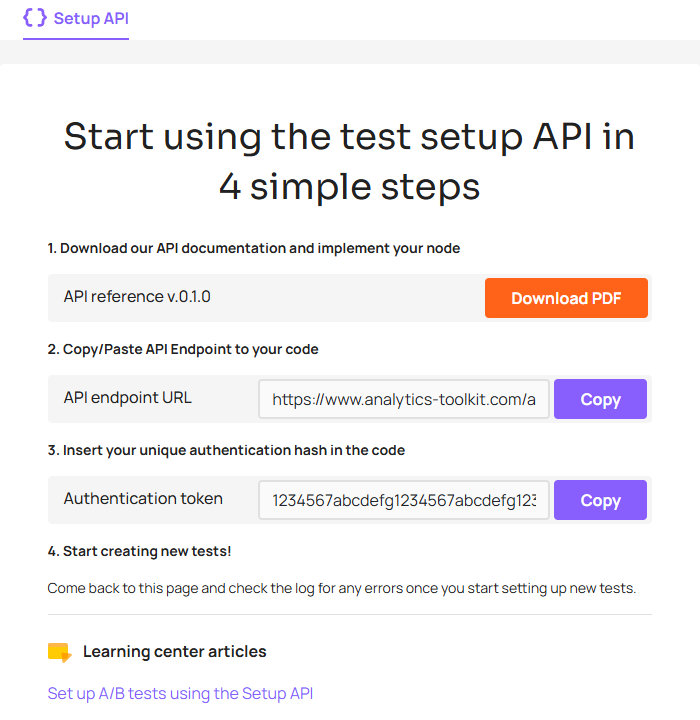
initial setup API configuration details
You should download the API reference and go through the document to understand the parameters supported by the interface. It also contains detailed information on responses and error codes.
The two pieces of information shared across all A/B tests that you may use the API to create are the endpoint and the authentication hash. The endpoint URL should therefore be hardcoded in your code. Ideally the code will handle redirects gracefully so that in case it changes your API implementation continues to work as before, but it is a forward looking requirement and we will make sure to communicate any API changes to all users in advance.
The second piece of information is the authentication string which is required for your API requests to be honored. It is a security mechanism against unauthorized use.
With these two steps finished, you are ready to create your first A/B test using the API.
Ongoing use of the API
Ideally, you want to be very familiar with the way sequential testing works and with the web-based interface for creating new A/B tests within the A/B testing hub. Once you've used and understand that flow, the Setup API can be employed to automate the process, though it may not be suitable for all tests you run. For example, if you are running very diverse types of experiments you would want to use the web-based interface to end up with the most suitable statistical design.
Note that by using the API you are giving up on our Advanced flow entirely which may result in sub-optimal test designs.
Once you start using the API the same page under Sources & APIs will contain a list of your most recent API calls, including their outcome and any errors encountered. This can be useful in monitoring and debugging your API calls.
Should you need to get an updated documentation file or retrieve the endpoint URL or your authentication hash, these will be available in the right sidebar, alongside the API call log, as shown above.
Common use-cases for the Setup API
Below are some example scenarios for using the API:
- running many tests on the same page or flow, using the same primary metric means is a prime candidate for such automation
- if you have test design templates for the most commonly run types of A/B tests, you can use the API to speed up the test setup process
- if you have a good idea of your hard deadline, you can set up any kind of A/B test
Key tips
- calling the API with a projectName which has not yet been used automatically creates a new project with that name
- store the testId returned from the API response to later use it with our Data API or Reporting API
- recent API responses are also available in the Analytics Toolkit interface under Account > Data Sources > Setup API
- all tests created using the Setup API are set to use our Data API as a data source

 A/B Testing Hub